Acquire the Best Range of Barcode Scanner to Various Companies

We all are known to the barcode scanners, commonly seen in supermarkets, retail shops or malls. At the billing counter, the employees at the sales counter handle these scanners, scans the products or item that you want to purchase and will be adding it to the bill. Finally, they provide you with a compiled bill. Barcode scanner makes it all easy for the supermarket. If you have a close look, it is not so easy too, with per-information updated in the backend, scanner obtains the information from the inventory section.

In today’s world, you can see barcode scanner everywhere from supermarkets to branded shops to retailers even to the mail that we receive and online payments to advertising with QR code everywhere. Have a look at the barcode, you will find the unique pattern of vertical black lines with white space. This has a numerical code under it when the scanner scans the code, the information is available to the shop keeper in its output device, a computer screen or the iPad. If you are looking to buy a barcode scanner in Pune, then Peddletech is the best option to choose. The commonly used barcode scanner are:

  • CCD- Charge-coupled device- consist of red laser light that uses to scan the barcode
  • 1D Scanners- the traditional types used to scan only barcodes
  • 2DScanners- Scans barcodes as well as QR codes

Nowadays, wireless scanners are available to remove the issue of movement restriction. Here is the list of the best barcode scanners offered by us.

General purpose Scanners
Name Type Scans per second Drop specification
Zebra LI4278 Cordless Scanner 1D barcode scanning 547 Scans per second Over 100drops at 5ft/ 1.5 m at room temperature; survives 6ft/1.8 m drops to concrete
Zebra DS9208 OMNIDIRECTIONAL Scanner 1D, 2D and PDF417 barcode scanning 1000 Scans per second Multiple drops at 4.0 ft./ 1.2 m to concrete
Zebra Symbol LS2208 Handheld Scanner Bi-directional 100 scans per second typical 1.5 metersdrops to concrete
Zebra Symbol LS1203 Barcode Scanner Bi-directional 100 scans per second typical Withstands multiple 5 ft./1.524m drops to concrete
Retail-Pos Scanner – RP 1500 1D, 2D barcodes GS1 Data bar and Stacked Code 100 scans per second typical 1.5 meters drops to concrete
       
  Rugged Scanner
Zebra LI3608-SR/LI3678-SR 1D ULTRA-RUGGED BARCODE SCANNER 1D barcodes 140,000+ Scan per full charge Multiple 8.0 ft. / 2.4 m drops to concrete
Zebra DS3608-SR/DS3678-SR Barcode Scanners 1D, 2D barcode scanning 100,000+ Scan per fullcharge Multiple 8.0 ft. / 2.4 m drops to concrete

To conclude, Peddle tech offers a wide range of top Zebra and Retail-POS Scanners in Pune. To know more on barcode printer price, get in touch with us today! Here are a few things you need to keep in mind before buying any scanner:

  1. Varieties of Scanners
    1. Laser– the most popular one that we find around us
    1. Linear image– usually take a picture of the barcodes. Carefully envision and extract the data or information out of the code
    1. 2-Dimensional Area Imagers: Captures the barcode picture and then analyzes it. 2D Area Imagers Scanner can read and analyze 1D, stacked and 2D barcodes
    1. CCD Barcode Scanners: Decodes the barcoded information and send further to the computer
  2. Forms of Scanners:
    1. Handheld: Most commonly used by many businesses, as it is easy to use, lightweight and operate
    1. Presentation: Can commonly be seen in the supermarkets, as they are placed on billing countertops for handless operations
    1. Mobile-Computer: Scanners are presented in both devices embedded with many features
    1. In Counter: Similar to the presentation scanner, commonly used in Super markets, grocery stores and self-check-out stores     
    1. Fixed Mount: Largely automated systems integrated into them, no buttons or triggers to scan, just place them up against the conveyor line or kiosk
  3. Know your business requirements: Before buying any printer or scanner, it is good to know what kind of scanner you require.
    1. Indoor or outdoor use or both
    1. Kind of symbols you need to scan
    1. The frequency for using scanner
    1. Any work environment drawbacks
    1. Mobility for your workers and assets
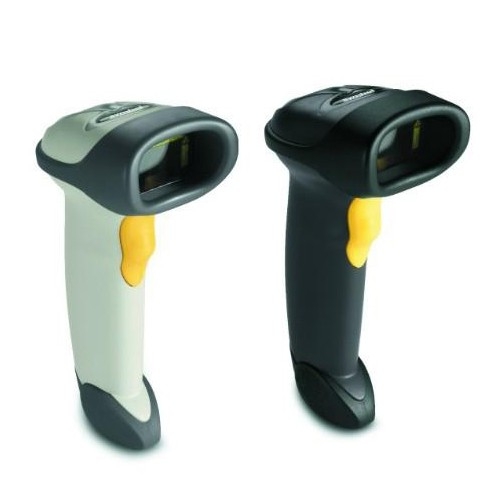
Zebra barcode scanner
Zebra Barcode Scanner

You need to evaluate more on the specification of barcode scanners in details to meet your end needs. Also, keep in mind what type of barcodes scanner, you actually need to categories your object data to conclude, pos  terminals  machine scanners are having an important place when it comes to managing and maintaining your inventory and stocks. With many helpful features, the barcode scanner is now an inevitable part of the day-to-day life of both customers and business. The significance of this machine is more, as it is many the transaction process easy and accurate. Do let us know your requirement and we will get in touch with you for the best scanner.            

Boost the Availability of POS Terminal Machines in The Retail Industry

To thrive today in the business environment, many ‘KIRANAS’ or retailers and stores are now replacing traditional methods with POS terminal machine in Pune to cut down the manual work of the business owner. This gives the owner to manage inventory and better shopping experience to their customer. With POS Systems, it becomes easy to keep up to the day-to-day retail functions ensuring uninterrupted business operations to the full extent. This system also saves time, effort in keeping the updates on accounting and inventory.

Here are a few proven and measurable benefits to be noted when using POS machines:

1. Reliable POS System Performance: After installation, it is recommended to permanently secure the admin-preferred configuration settings. This will eliminate the changes like malicious software, cookies, software updates, and modification in files or modified files done by the users. So, your IT professionals can maintain the configuration uniformity of your POS system

2. Seamless Retail Operation: With POS System, it becomes easy for the retailers to ensure all the endpoints are always met and running. Thus, business owners will improve service availability and increase the lead conversion

3. Helping digitalize small retailers: With the help of POS terminal Machines, the small merchants, retails can be digitalized and accept payments, through cards or UPI, QR codes and manage their accounts and inventories

4. Digital Presence: With a POS system, you can include the online store in your plan. So you can sell your products around the corner and create a presence around the world.

5. Simplified Operations: This machine helps to simplify your operations task and gives you more time to spend on other important activities. Not only it simplifies, but you can also handle the refund process, Home delivery and sell the products in person

Wireless and smart POS machine are increasing all over our country’s retail picture. With the above benefits, we have also seen the importance of POS System importance. Let’s have a look:

– This is a comprehensive solution to overcome multiple issues that small merchants, retailers face on day to day basis

– Apart from simplifying the faster and safe transaction, it also automatically calculates and tracks the products in inventory, changes in the product price and update the inventory accordingly

– POS helps to capture customer behaviour data, buying trends. This helps the owner to offer discounts, great deals to valued customers

– With this terminal machines, the retailers can keep themselves available and reliable source store for the customers walking in

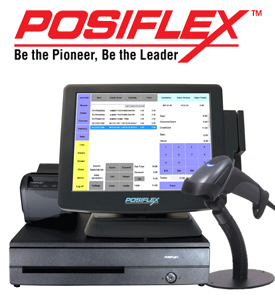
Posiflex POS  Terminal
Posiflex POS Terminal

By enhanced availability of POS system, the retail store can offer customers more sales and enriched shopping experience consistently. Peddletech, the posiflex  POS system provider, offers a wide range of Posiflex POS System, Retail POS, and Barcode Scanner of Zebra, Receipt Printer of Rugtek, Zebra and accessories for every business owner. If this article convinces you, then to know more on the POS machine price, get in touch with us on response@peddletech.com or give us a call on +91-8806951951. Our experts will show you how you upgrade your business with the POS System.

How to choose the right POS or Receipt Printer?

In Point-of-sales Industry there are two types of printers – thermal and dot-matrix. These are unknown to most of us. So, what is the difference between thermal printing and dot-matrix printing? What is the special need of this in Retail POS system? Let’s have a look into the difference between these two printer types, their advantages, disadvantages.

Thermal Printers: this is the most common choice for the retail and fast-moving business stores that operating under normal circumstances. In thermal POS printer, printing is done by burning paper with the hot printing head.

Here are the advantages of Thermal printers: Faster printing than laser

  • Quieter than laser
  • High resolution
  • No need to change the toner or ink except the paper roll

Here are the disadvantages of Thermal printers:

  • Thermal paper is sensitive to heat. So if the printer is near a warm place or area, your paper will turn in black and the receipt will be illegible
  • Only available in black colour printing
  • Special thermal paper is costly than the regular paper

Dot-matrix printers: these are also POS printer, mostly used where the point-of-sales is high and heat environments or multiple copies of receipts are required with every print. These are normally used at the restaurant where multiple copies are required.

Here are the advantages of Dot-matrix printers:

  • No problem with Hot/cold temperatures for this type of printing
  • Affordable ink-ribbons
  • Affordable plain – the paper is easily available
  • Easy print on two-ply paper
  • Two-colour option available

Here are the disadvantages of Dot-matrix printers:

  • Slow in printing
  • Loud and noisy
  • Low resolution
  • Need to change the ink-ribbon

There is the common application of Posiflex POS System, where both applications are utilized. Normally, restaurants, hotels etc use thermal printer POS system in front desk and Dot-matrix in kitchen. 

Now, you got to know how the POS printer system works. The Receipt printer is the integral part POS system and of the food industry too. Here are steps to determine how to choose the best POS receipt printer for your business:

  1. What are your business requirements for the printer?

This is the most important question to be considered while buying any POS receipt printer. It totally depends on what you need in terms of quality, colour, speed and machine handling. Here are normally, three types of printers available in the market- thermal, Impact and Ink jet printers. Narrow down your search by selecting the best suitable printer for your business. Here are a few points to be noted:

  • Compact design – space saving
  • Rugged design for heavy handling and use
  • Easy installation and integration
  • Able to reduce the cable clutter
  • Quick printing ability or speed

At Peddletech, we offer a wide range of receipt printer – Thermal printers and Bluetooth receipt printers from Rugtek, Bixolon, Posiflex and Retail POS

  • Budget- The second most important point

Now that you have decided which receipt printer to buy, you need to concentrate on the pricing too. It would be the best way to determine how much you want to spend on buying this system. Depending on your requirement of receipt printer, you can buy the appropriate one. If you have less paper printing work then, you can go for the minimal ink-jet one. If want the high quality work then it is best to buy Thermal printer

  • Next question comes- is the receipt printer compatible with your POS system?

Yes, it important to also check whether the new receipt printer is compatible with your existing POS system. It is recommended to buy the receipt printer of the same company of POS system you have.Let us know what you are looking for in a receipt printer. We, Peddletech is well-known POS terminal provider in India. Give us a call on +91-8806951951 or let us know your requirement at response@peddletech.com. Our experts will get in touch with you for the POS terminal price in India.

Advantages and Disadvantages of ‘Contactless Payment’

Contactless Payment has made payment simple and easy for the customers. This allows customers to pay for the goods and services purchased at the POS terminal. Today you can make the payment just by waving the card. No need to swipe your plastic card and input the pin to allow the transaction and get the receipt of the payment. Contactless payment is now becoming more popular because of its simple and fast processing. In this article, we highlight the advantages and disadvantages of “Contactless Payment”:

Advantages for customers:

  • It is a convenient way of making payment. So, you can pay by card or phone directly, no need to move around with cash and cards. And no hassles of the PIN to approve the transaction
  • A secure mode of payment done between two devices. No fraudulent transactions, no worries for customers. In the contactless payment system, your card doesn’t come in contact with any device
  • It reduces the threat of hackers stealing sensitive and valuable information
  • The contactless payment systems are available on different mediums such as smartphones, key fobs, vehicles, or any other mobile system
  • It proves to be a cost and time-efficient way for the average customer. This method is much easier than other payment methods. With the use of a contactless payment card, customers can do the transaction without taking it out of the wallet. Thus saving much time of your customer
  • No more typo errors in entering your PIN, as this payment system is accurate, secure and swift
  • Your customers can also keep track of loyalty points, rewards during purchases and encash them as per convenience

Disadvantages for customers

  • Only a few merchants use this contactless payment system
  • Not all your customers are educated on using this technology and create frustration among users
  • With the e-payment apps on the mobile phone, customers can use this technology
  • It can be a risk of malware or spyware attack on the device on the e-payment apps to steal your valuable and sensitive information
  • The worst thing is that you can’t change the limit per transaction that is already chosen by your bank

Advantages for businesses

  • Contactless payment system- Speed is the biggest advantage. It reduces waiting time, customers don’t have to search for cards in their wallet. Ultimately, as a business owner, you have offered complete customer satisfaction. Moreover, you have a simplified cash management
  • This method, merchants, business owners are able to accept more payments during peak times and reduce the delays
  • No charge any commission on transactions! So, companies or business owners don’t have to pay any additional fees if their customers use the app. (Only the standard card processing fees is charged if you are using Android app)
  • As a business owner, you can optimize loyalty programs and improve customer relationships. With the help of customer data, you can push alerts, notification or digital copies of loyalty, reward, membership/ gift cards, special offers to your customer’s mobile phone

Disadvantages for businesses

  • Some business may have trouble paying if they are unaware of the process, or they don’t have featured mobile
  • The older generation may have difficulty using e-payment apps from the mobile phone. Due to lack of knowledge and process, they might feel unprotected by this method

To conclude, contactless payment methods are now a reality and more as a customer we get acquainted with this will make our payment process easy and fast. We at Peddletech offer a range of Retail POS systems and POS terminals and equipment like barcode scanner, barcode printers and more on. Give us a call on +91-8806951951 or let us know your requirement at response@peddletech.com. Our experts will get in touch with you for the Posiflex POS System requirement.

The Benefits of Moving to a Point-of-Sale (POS) System

Point-of-sales is mostly applicable to all types of businesses irrespective of their magnitudes and categories. Indirectly or directly it covers every business owners and their customers. POS is a combination of hardware and software components. If you think to buy POS terminal is an unnecessary expense, then you are wrong. Have a look closer to the benefits obtained by the Retail POS System. Point-of-sales systems are more accurate compared to the traditional manner. There are main points to be noted before we move on to the advantage:

1. Accuracy: More accurate Scanning than punching in numbers on the stocks

2. Analysis: POS systems lets you manage inventory, analyze sales pattern and 

Peddletech experts give you countless benefits of Point-of-sales for small, medium, large or any size of businesses.

Here are the benefits:

1. Easily available in the market and can you can choose the best suitable for your business

2. Posiflex POS System is known for faster, easier and cheaper to install

3. Simple Deployment

4. Eliminates human error, saves time and money

5. Peripheral barcode scanner facilitates making transactions execution very quickly saving the customer time

6. Cloud-based POS is easy to install

7. With the Cloud-based POS system, it is easy to update software, take backups

8. POS sales include maintenance, software updates, technical support system

9. Track and manage your Inventory or stock in real-time

10. Monitor sale records alert when stock is running out

11. Automatically generates accurate reports and reduces your paper work. Sales records are generated on an hourly, daily, weekly and monthly basis to give you a better idea about how your business is going on

12. POS maintains accurate records of daily transactions and reports about the stock volume

13. POS also allows you to categories your stock as per brand, size, shape and multiple subfields

14. Make your CRM (Customer relationship management) better with Retail POS

15. Easy to look for the past transaction within a few clicks

16. Customers get a more detailed itemized receipt with discounts and offer applied

17. Cut down the chance of human errors and rechecks the bill amount b recalculating

18. POS allows to add discounts, promotion code, and offer available on the product

19. Allows you to control sales operations, return operations, inventory management, sales transaction, employee check-in and check-out, employee working hours, shift management

20. Allows to keep customer credit card information private

21. Successfully running the promotion for different locations of your store

22. With cloud-based POS, you can successfully manage your manage from anywhere and at any point of time

23. Allows you to find the loopholes in business, so that you can find the solutions for the issues and also plan for business expansion, marketing strategies

Here, Peddletech provides the best Posiflex POS System in India, if you want to know more about the POS system machine and equipment. We aim to fulfil your POS System machine requirement. If this article convinces you, give us a call on +91-8806951951 or let us know your requirement at response@peddletech.com. Our experts will show you how you upgrade your business with the POS System.

Best Shipping Label Printer & Thermal Printer for Business (2019)

Desktop printer  is an essential need of every office. Being the business owner printer requirements are different for each product. The label printer is different from the typical printers, as they print the labels of your product. Whereas, the thermal printers are used to print small items such as payment receipts, and shipping labels. Let’s understand the difference between the label printer and thermal printer.

1. Label printer: This is a special-purpose printer that has been designed to print labels, tags, barcodes on non-adhesive labels, card stocks, rolled socks or on tear sheet stock.

2.Thermal printer: These are mostly used to print items such as receipts or shipping labels.

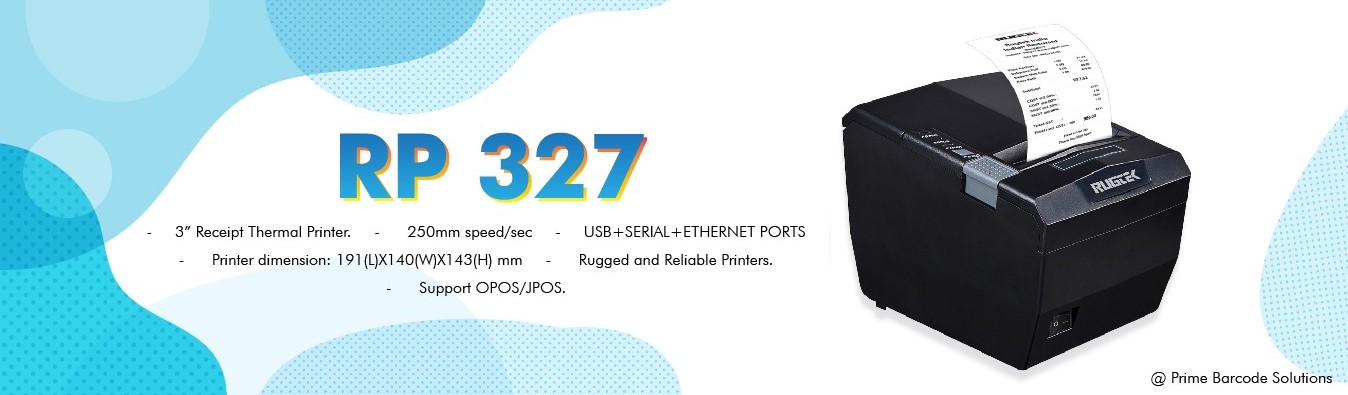
Thermal Printer

Peddletech is one-stop-shop offering range of industrial used printers at a competitive price. Here is the list of best shipping label printer and thermal printer for your business.

1. Thermal Receipt Printer: thermal printers are mostly connected to the office computer with the help of USB cable or with the distinct wireless connection. Here is the list of best Thermal Receipt Printer that you require for your office purpose:

i.RUGTEK

ii. POSIFLEX

iii. BIXOLON

iv.RETAIL-POS

Here is the pro’s using Thermal Receipt Printer

• Easy and time-efficient installation process

•User-friendly operation

•Affordable and quick speed printing

As this thermal printers are easy to install and operates at very high speed. The design is sturdy. The printer also keeps a track of the number of labels printed. When it comes to advanced models, it is easy to categorize the contacts, simplify the labelling process. For commercial utilization, label printers are designed for printing retail marketing price tags, barcodes, shipping tags, packaging and warehouse labels, bulk labelling and much more

2. Bluetooth Printer: These are lower power wireless printers networking protocol to connect within the close range, so printing will be easy for those who require printer nearby. Nowadays, laptops and computers equipped with Bluetooth built-in. This makes easy to print receipts and barcodes. Peddletech offers a wide range of the best  bluetooth printer machine  of Rugtek brand that you require for your office purpose.

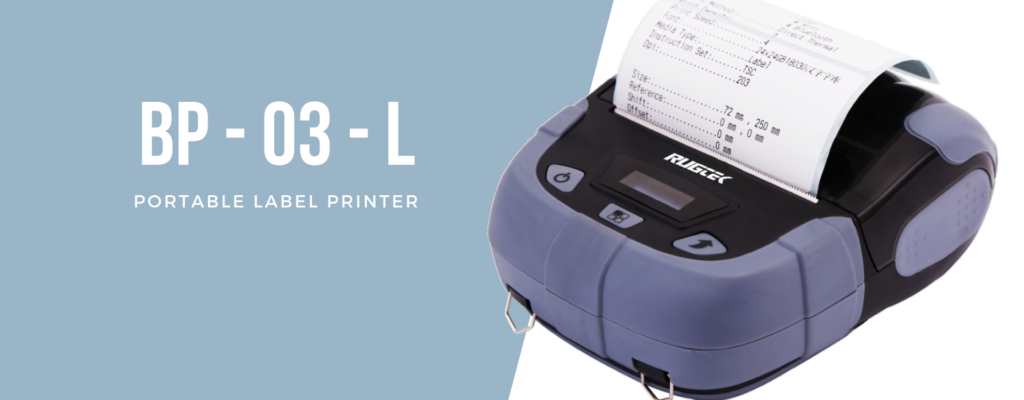
Bluetooth Printer

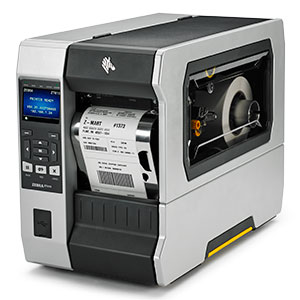
3. Barcode Printer: If you are handling the small or big grocery store or need to label inventory in easily, then this is the one you can have. The barcode printer is specially designed to produce barcode labels that can be a sticker or attached to objects or products. These printers can be used for small to big industrial users and mostly used in shipping products. Peddletech offers a wide range of the best barcode printer machine of Zebra brand that you require for your industrial purpose.

Barcode Printer

We are one-stop-shop for the latest receipt printer and barcode printer and equipment.

To conclude, here are a few important points to be noted:

• Understand your printing requirements or needs

•Printing workload- buy a print that can handle your printing workload. Depending on this aspect, buy the print in size and shape and equipped with different features

•Considering print resolution is also important. Depending on your requirement buy the high-resolution printer with the high density for the better outcome

•Printing performance depends on the compatibility specification if the print works with the existing device and application. The key point is to maximize your productivity

•Last but not the least, product warranty and customer support is the must when you get the printer

Give us a call on +91-8806951951 or let us know your requirement at response@peddletech.com. Our experts will get in touch with you for the barcode printer machine requirement.

The Difference Between a Cloud-Based POS vs. Traditional POS

The Difference Between a Cloud-Based POS vs. Traditional POS

Firstly, let’s understand the terminology: We know how much Point-of-Sales is important when it comes to keeping records of sales and inventory up-to-date. What we see at stores are both types of POS- traditional as well as cloud-based one. Peddletech is a well-known provider for POS billing machine in India catering exact needs of store owner related to the sales and inventory update. Let’s now get in detail discussion of the difference between a cloud-based POS vs. Traditional POS
Firstly, let’s understand the terminology:

Traditional POS– Also, known as “On-Premise” or “Legacy”, in this type of POS, the data is stored on local servers and runs on closed internal networks.

Cloud-Based POS– Referred to SaaS- “Software as a Service” or web-based or cloud-based POS Systems. These systems are web-hosted solutions and the data is stored on remote servers on clouds and the information is accessible at any point of time online. The customer just needs to access through the email ID and get the complete information within a few clicks.

Traditional POS vs Cloud POS

Traditional POS

Payments: License fees + monthly maintenance

Software: On-Premise installation

Hardware: Stationary Terminals

Data Storage: Requires internal back office server

Maintenance: On Location

Data Accessibility: Accessed on Site only

Data Loss Risk: If the system crashes, the massive data will be lost as the data is stored on local servers in a closed network

Frequent updates: Needs to be updated manually on-site, fewer updates- once a year

Internet dependency: No internet required

Integrated Systems: Often difficult to integrate new modules, features and updates. Because of this, it is hard to customize the system

Cost: Costs vary depending on individual needs and requirements.

Cloud-based POS

Payments: Monthly payments

Software: Hosted online can be installed at any time

Hardware: Mobile, Tables and Stationary

Data Storage: Remote Cloud Servers

Maintenance: Secured remote accessibility

Data Accessibility: Data Can be access from anywhere at any time

Data Loss Risk: Risk of losing data is minimal, as the data is stored in the cloud in a secure way with strict data accessibility

Frequent updates: The updates are automatically and remotely. No need for a site visit for updating the system

Internet dependency: Heavily dependent on the internet. If no internet, slow, can affect the business badly

Cost: Costs vary depending on individual needs and requirements.

Now, we move to the next comparison table to understand the difference in a much better way:

So why not moving to the cloud-based system instead of traditional ones? At PeddleTech, we offer an agile SaaS system providing exciting opportunities for cafes, restaurants, hotels and Food malls where cost and efficiency play a significant role.

We know that each business has unique needs and Cloud-based POS improves your business by 15%in terms of time-saving and process ordering in restaurants, hotels and food malls. The orders can also be modified if required. With innovative hardware, the revolution in commerce and food industry has improved altogether and modernized services.

Efficient POS Terminal in India is booming in various sectors of the food industry and grocery stores. Peddletech is POS terminal provider in India to different business matching to their needs and values. We hope that these comparisons help you to understand the difference between both POS terminals and find the right one for you!              

Everything You Need to Know About POS Terminals

Everything You Need to Know About POS Terminals

Gone are the traditional operating systems of keeping records of payments and inventories and moreover managing cash. Peddletech, POS terminal provider India does all for your retail business to move ahead in a systematic and easy manner. Operating your retail store calls an array of administrative and management skills including marketing sector too. This includes handling your inventory, adding in the monthly report, billings empowering you to run your store smoothly without any hiccups.

Let’s understand what is POS Point Of Sales System?

This is an electronic device used to process payments through cash or card at your retail store or location. POS features:

•          Reads customer’s credit card or debit card information

•          Checks for sufficient fund balance in customer’s account

•          Post-transaction transfers funds from the customer’s account to the sellers’ account

•          Records transactions and generates prints of receipts

The POS serves as the central component for your business and is the hub of everything – sales, inventory, customer management and many more.

Let’s have a look at the difference between the On-Premise and Cloud POS:

On-Premise POS Cloud POS
Buyer needs to purchase one or more licenses and install software on computer systems by the IT Expert Buyer can access the software on any device at any time, as it is connected with internet
Buyer needs to update and maintain the software Updates are available online and pushed to the POS
Require dedicated IT professional Individual from company are required to manage the Cloud POS
Required costly hardware to be purchased Minimum upfront cost

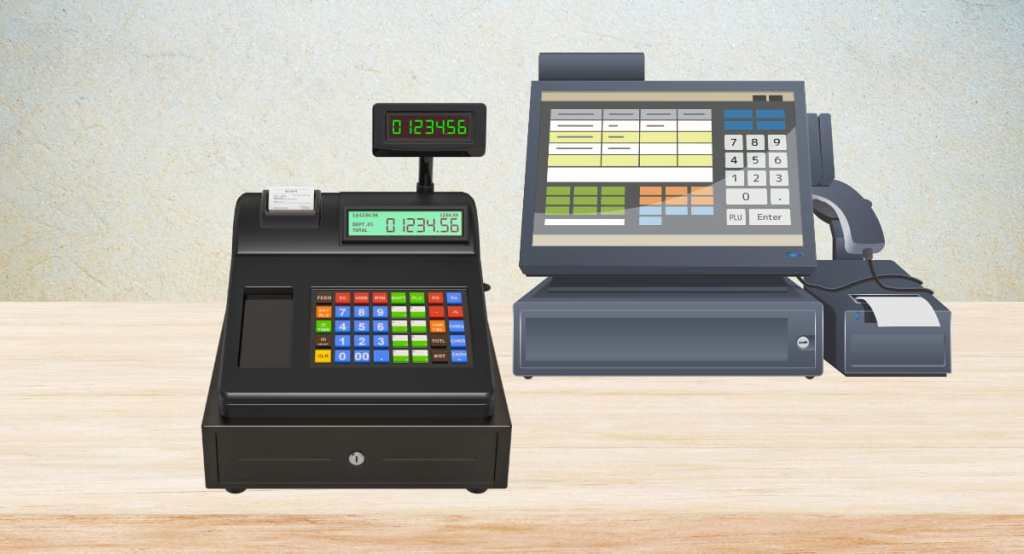
When you are deciding to buy the POS terminal in India, Peddletech caters the below hardware components of this system:

Monitor or Tablet: This will displays the product database, stocks, prices and other functions such as employee check-in and check-out, viewing sales report. iPads and tablets replace bulky monitors and make the work easier.

Barcode scanner: This automates the check-out process. With the Barcode scanners, the seller can pull the product info and add it to the check-out procedures. It can also be integrated with inventory management systems to automatically adjust the stocks.

Credit card reader: With secure and EMV compliant credit card reader, no business owner faces the fraud liability and possibly huge losses.

Cash Drawer:  This is something that most of the retail owner is looking for. Cash is the King. This will help you to secure your cash in a drawer with automatic locking and unlocking system.

Receipt Printer: Printer receipts are still essential after the bill payment is made. And with this, as a store owner, you can easily print the receipt and handover to your customer.

Key features of the Posiflex POS system:

As a business owner, you come across too many task tedious tasks and also is resource exhaustive. With our right POS system, you can simplify the daily crucial business operations at ease and with greater proficiency. Here are a few key benefits of using POS systems:

Sale Reporting: Now record the sales data and analyze it for business decisions. This enables you to have a look at your sales report. The sales data will be accessed at ease.

Inventory management: It makes easy for you to keep data of stock quantity and determine when and how much is required. You can often reorder according to your inventory needs.

Customer management: Once the purchased is logged, you can get in touch with customers through marketing tools for pushing notifications of discounts and promotional offers.

Employee management: Easy to track your employee log-in and log-out details. Analyze your top-performing employee at the same time.

Lastly, if you are choosing the best POS Systems for the first time, then start making the list of features that you require. It is most important to see usability and agility in POS. Once you start looking for a POS system, check out the Posiflex POS system price at Peddletech and get the best services for your business.

Design a site like this with WordPress.com
Get started